Piotr Błaszczak
JavaScript & PHP Developer at Nowoczesna Firma S.A.
7 years of experience in web development
JavaScript
ExtJS, Yui, DojoToolkit, jQuery-UI, BackboneJS & MarionetteJS AngularJS, Yeoman, NodeJS
PHP & MySQL
Zend Framework, Yii, Symfony 2, Zend Framework 2, Doctrine 2
Agenda
SPA, routing, AngularJS, UI-Router
Setup & configuration
States inheritance
$state, ui-view, ui-sref, ui-sref-active
Resolve & data
Named views
Events
404 not found, Authentication, Authorization
Animations
Single Page Application
One request & one page load
Resources are dynamically loaded and added to the page,
No page reloads, everything works in background
High use of Ajax, WebSockets, Json, Xml
Provides more fluid user experience
But what about SEO & url sharing
Routing
Translates page URL
http://localhost/contacts/edit/23 (edit contact id: 23)
#hash
HTML 5 history.pushState()
$route
$state
AngularJS
Controllerfunction MyController($scope) {
$scope.name = "AngularJS"
$scope.reply = function(){ alert('reply') }
}
HTML<div ng-controller="MyController">
Hi, i'm {{name}}
<a ng-click="reply()">Say Hi</a>
</div>
AngularJS
ServicemyApp.factory('myService', function () {
return { .. }
})
ControllermyApp.controller('MyController', function($scope, myService) {
myService.runIt()
}
UI-Router
$route<a href="/">Home</a>
<a href="/items">Item list</a>
<a href="/items/item/44">Item 44</a>
$state<a ui-sref="welcome">Home</a>
<a ui-sref="items">Item list</a>
<a ui-sref="items.item({id:44})">Item 44</a>
Setup
Require Scripts (index.html)
                    <script src="angular.js"></script>
                    <script src="angular-ui-router.js"></script>
                    <script src="app.js"></script>
define your app module (app.js)
var myApp = angular.module('myApp', ['ui.router']);
ng-app (index.html)
<html ng-app="myApp">
Configuration
In your index.html<a ui-sref="welcome">Home</a>
<a ui-sref="contact">Contact</a>
<div ui-view></div>
In your app.jsmyApp.config(
function($stateProvider, $urlRouterProvider, $locationProvider) {
$stateProvider
.state('welcome', {...})
.state('contact', {...})
$urlRouterProvider.otherwise("/");
$locationProvider.html5Mode(true);
});
State definition
$stateProvider
.state('welcome', {
url: "/",
templateUrl: "views/welcome.html"
})
.state('contact', {
url: "/contact",
templateUrl: "views/contact.html",
controller: 'ContactController'
})
Demo
Inheritance
index.html (has root ui-view)
views/products.html (has ui-view)
views/product.html
Inheritance - state definition
$stateProvider
.state('products', {
url: "/products",
templateUrl: "views/products.html",
controller: 'products'
})
.state('products.product', {
url: "/product/:id",
templateUrl: "views/product.html",
controller: 'product'
})
Inheritance - template
views/products.html
<ul class="left">
<li ng-repeat="product in products">
<a ui-sref="products.product({id: product.id})">
{{product.name}}
</a>
</li>
</ul>
<ui-view class="center"></ui-view>
Demo
$state service
$state.go('contact.detail')
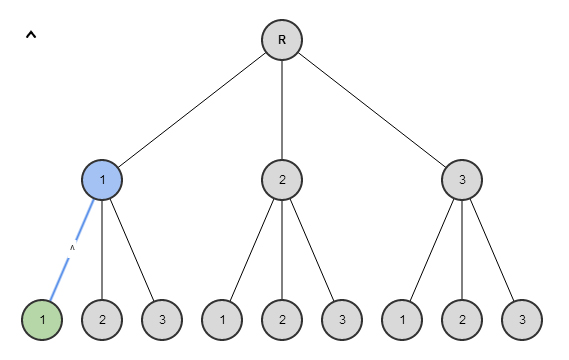
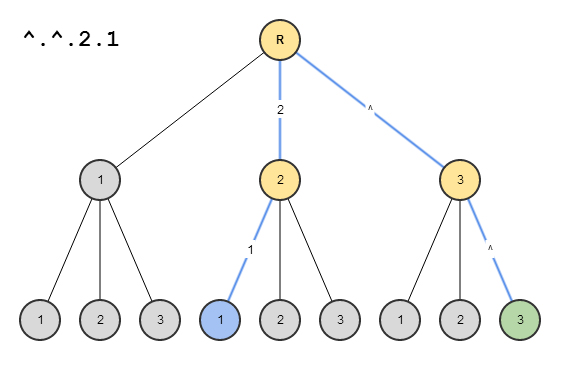
$state.go('^') //will go to a parent state.
$state.go('^.sibling') //will go to a sibling state.
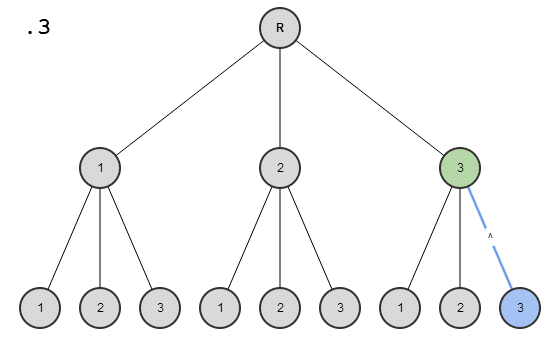
$state.go('.child.grandchild') //will go to a grandchild state.
with state params
// assume state url is: /contact/detail/:id
$state.go('contact.detail', {id:44})
// wil redirect to: /contact/detail/44
ui-sref directive
ui-sref='stateName' - Navigate to state, no params.
'stateName' can be any valid absolute or relative state, following the same syntax rules as $state.go()
ui-sref='stateName({param: value, param: value})' - Navigate to state, with params.
ui-sref-active directive
ui-sref-active='class1 class2' - classes "class1" and "class2" are each added to the directive element when the related ui-sref's state is active, and removed when it is inactive.
<ul>
<li ui-sref-active="active" class="item">
<a href ui-sref="app.user({user: name})">{{name}}</a>
</li>
<!-- ... -->
</ul>
$stateParams service
// If you had a url on your state of:
url: '/users/:id/details/{type}/{repeat:[0-9]+}?from&to'
// Then you navigated your browser to:
'/users/123/details//0'
// Your $stateParams object would be
{ id:'123', type:'', repeat:'0' }
// Then you navigated your browser to:
'/users/123/details/default/0?from=there&to=here'
// Your $stateParams object would be
{ id:'123', type:'default', repeat:'0', from:'there', to:'here' }
Named views Configuration
// home page
.state('welcome', {
url: "/",
templateUrl: "views/welcome.html"
})
// main application layout
.state('app', {
abstract: true,
views: {
"": {
templateUrl: "views/layout.html"
},
"navbar@app": {
templateUrl: "views/navbar.html"
}
}
})
// products page layout
.state('products', {
url: "/products",
parent: 'app',
views: {
"": {
templateUrl: "views/products.html"
},
"content@products": {
template: "Default product list page, ready for your customization"
},
"menu@products": {
templateUrl: "views/menu.html",
controller: 'ProductsController'
}
},
resolve: {
products: function(){
return [
{id:1, name: 'AngularJS', features:['routing', 'services', 'directives', 'data binding']},
{id:2, name: 'ReactJS', features:['faster', 'routing', 'data binding']},
{id:3, name: 'EmberJS', features:['fast', 'routing', 'data binding']},
]
}
}
})
// product features list
.state('products.product', {
url: "/product/:id",
views: {
"content@products": {
templateUrl: "views/feature-list.html",
controller: 'FeatureListController'
}
}
})
// single feature view
.state('products.product.feature', {
url: "/feature/:index",
views: {
"content@products": {
templateUrl: "views/feature.html",
controller: 'FeatureController'
}
}
})
// feature edit in parent template
.state('products.product.feature-edit', {
url: "/feature-edit/:index",
views: {
"navbar@app": {
template: "<b>Edit Tools hoses here</b>"
},
"@app": {
templateUrl: "views/feature-edit.html",
controller: 'FeatureEditController'
}
}
})
// feature edit in modal
.state('products.product.feature-view', {
url: "/feature-view/:index",
views: {
"modal@": {
templateUrl: "views/modal-layout.html"
},
"@products.product.feature-view": {
templateUrl: "views/feature-edit.html",
controller: 'FeatureEditController'
}
}
})
// contact page rendeed in app layout
.state('contact', {
url: "/contact",
parent: 'app',
views: {
"": {
templateUrl: "views/contact.html"
}
}
})
Named views Controllers
function ProductsController($scope, products) {
$scope.products = products;
})
function FeatureListController($scope, $stateParams, products, $filter) {
$scope.id = $stateParams.id;
$scope.product = $filter('filter')(products, $stateParams.id)[0];
}
function FeatureController($scope, $stateParams, products, $filter) {
$scope.id = $stateParams.id;
$scope.product = $filter('filter')(products, $stateParams.id)[0];
if($scope.product) {
$scope.feature = $scope.product.features[$stateParams.index]
}
}
function FeatureEditController($scope, $stateParams, products, $filter) {
$scope.id = $stateParams.id;
$scope.product = $filter('filter')(products, $stateParams.id)[0];
if($scope.product) {
$scope.index = $stateParams.index;
}
})
resolve
.state('products', {
...
resolve: {
user: function($http){
return $http.get('/user/profile')
}
},
controller: function($scope, user) {
$scope.user = user;
}
})
data
.state('products', {
...
data: {
acl: ['admin']
}
})
$rootScope.$on('$stateChangeStart', function(event, toState){
console.log(toState.data.acl);
// Would print "['admin']" when 'parent' is activated
})
events
$rootScope.$on('$stateChangeStart', function(event, toState){
console.log(toState.name);
})
$stateChangeSuccess //fired once the state transition is complete.
$stateChangeStart //fired when the transition begins.
$stateNotFound //fired when a state cannot be found by its name.
$stateChangeError //fired when an error occurs during transition.
Authentication
$rootScope.$on('$stateChangeStart', function(event, toState){
if(toState.data.acl && !userSrv.has(toState.data.acl)) {
event.preventDefault();
$state.go('login');
}
})
Animations
You can animate state change on ui-view with ngAnimate module
just like any other angular element with animation support
ui-router + ngAnimate +
Animate.css
Animations with ui-router
<div ui-view class="view-change-animation "></div>
.view-change-animation.ng-enter {
        -webkit-animation: bounceInLeft 1s;
        animation: bounceInLeft 1s;
}
.view-change-animation.ng-leave {
        -webkit-animation: bounceOutRight 2s;
        animation: bounceOutRight 2s;
}
Demo
Demo 2
Nestet Views Animation
Demo